Red Hat Certified Engineer (RHCE) exam for Red Hat Enterprise Linux 8 온라인 연습
최종 업데이트 시간: 2026년09월21일
당신은 온라인 연습 문제를 통해 RedHat EX294 시험지식에 대해 자신이 어떻게 알고 있는지 파악한 후 시험 참가 신청 여부를 결정할 수 있다.
시험을 100% 합격하고 시험 준비 시간을 35% 절약하기를 바라며 EX294 덤프 (최신 실제 시험 문제)를 사용 선택하여 현재 최신 20개의 시험 문제와 답을 포함하십시오.
/ 1
Question No : 1
Create a jinja template in /home/sandy/ansible/ and name it hosts.j2. Edit this file so it looks like the one below. The order of the nodes doesn't matter. Then create a playbook in /home/sandy/ansible called hosts.yml and install the template on dev node at /root/myhosts
정답: Solution as:
Question No : 2
Create a file called specs.empty in home/bob/ansible on the local machine as follows:
HOST=
MEMORY=
BIOS=
VDA_DISK_SIZE=
VDB_DISK_SIZE=
Create the playbook /home/bob/ansible/specs.yml which copies specs.empty to all remote nodes' path /root/specs.txt. Using the specs.yml playbook then edit specs.txt on the remote machines to reflect the appropriate ansible facts.
정답: Solution as:
Question No : 3
Create the users in the file usersjist.yml file provided. Do this in a playbook called users.yml located at /home/sandy/ansible. The passwords for these users should be set using the lock.yml file from TASK7. When running the playbook, the lock.yml file should be unlocked with secret.txt file from TASK 7.
All users with the job of 'developer' should be created on the dev hosts, add them to the group
devops, their password should be set using the pw_dev variable. Likewise create users with the job of 'manager' on the proxy host and add the users to the group 'managers', their password should be set using the pw_mgr variable.
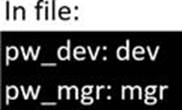
Create an ansible vault password file called lock.yml with the password reallysafepw in the /home/sandy/ansible directory. In the lock.yml file define two variables. One is pw_dev and the password is 'dev' and the other is pw_mgr and the password is 'mgr' Create a regular file called secret.txt which contains the password for lock.yml.
정답: ansible-vault create lock.yml
New Vault Password: reallysafepw
Confirm: reallysafepw
Question No : 5
Create a file called requirements.yml in /home/sandy/ansible/roles a file called role.yml in /home/sandy/ansible/. The haproxy-role should be used on the proxy host. And when you curl http://node3.example.com it should display "Welcome to node4.example.com" and when you curl again
정답: Solution as:
Check the proxy host by curl http://node3.example.com
Question No : 6
Create a file called requirements.yml in /home/sandy/ansible/roles to install two roles. The source for the first role is geerlingguy.haproxy and geerlingguy.php. Name the first haproxy-role and the second php-role. The roles should be installed in /home/sandy/ansible/roles.
정답: in /home/sandy/ansible/roles
vim requirements.yml
Run the requirements file from the roles directory:
ansible-galaxy install -r requirements.yml -p /home/sandy/ansible/roles
Question No : 7
Create a role called sample-apache in /home/sandy/ansible/roles that enables and starts httpd, enables and starts the firewall and allows the webserver service. Create a template called index.html.j2 which creates and serves a message from /var/www/html/index.html Whenever the content of the file changes, restart the webserver service.
Welcome to [FQDN] on [IP]
Replace the FQDN with the fully qualified domain name and IP with the ip address of the node using ansible facts. Lastly, create a playbook in /home/sandy/ansible/ called apache.yml and use the role to serve the index file on webserver hosts.
In /home/sandy/ansible/roles/sample-apache/handlers/main.yml
Question No : 8
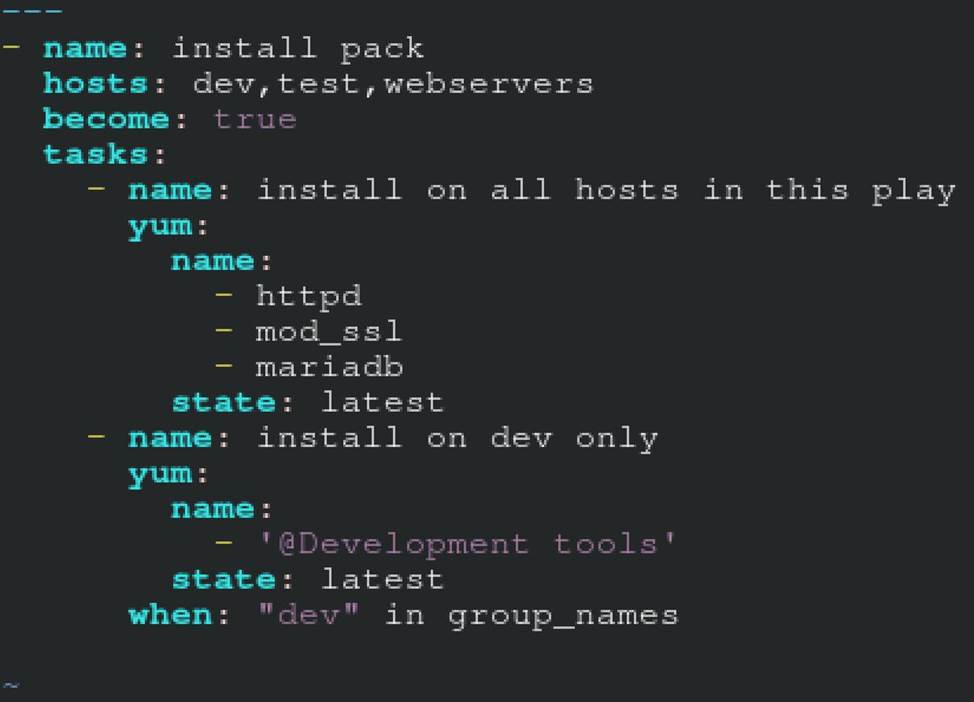
Create a file called packages.yml in /home/sandy/ansible to install some packages for the following hosts. On dev, prod and webservers install packages httpd, mod_ssl, and mariadb. On dev only install the development tools package. Also, on dev host update all the packages to the latest.
정답: Solution as:
** NOTE 1 a more acceptable answer is likely 'present' since it's not asking to install the latest state: present
** NOTE 2 need to update the development node
- name: update all packages on development node yum:
name: '*'
state: latest
Question No : 9
Create a file called adhoc.sh in /home/sandy/ansible which will use adhoc commands to set up a new repository. The name of the repo will be 'EPEL' the description 'RHEL8' the baseurl is 'https://dl.fedoraproject.org/pub/epel/epel-release-latest-8.noarch.rmp' there is no gpgcheck, but you should enable the repo.
* You should be able to use an bash script using adhoc commands to enable repos. Depending on your lab setup, you may need to make this repo "state=absent" after you pass this task.
정답: chmod 0777 adhoc.sh
vim adhoc.sh
#I/bin/bash
ansible all -m yum_repository -a 'name=EPEL description=RHEL8 baseurl=https://dl.fedoraproject.org/pub/epel/epel-release-latest-8.noarch.rmp gpgcheck=no enabled=yes'
Question No : 10
0.2.25 node5.example.com
yum -y install ansible
useradd ansible
echo password | passwd --stdin ansible
echo "ansible ALL=(ALL) NOPASSWD:ALL" > /etc/sudoers.d/ansible
su - ansible; ssh-keygen
ssh-copy-id node1.example.com
ssh-copy-id node2.example.com
ssh-copy-id node3.example.com
ssh-copy-id node4.example.com
ssh-copy-id node5.example.com
***Each manage node setup***
First, add an extra 2GB virtual harddisk to each control node 1,2,3. Then add an extra hard disk to control node 4. Do not add an extra hard disk to node 5. When you start up these machines the extra disks should be automatically located at /dev/sdb (or /dev/vdb depending on your hypervisor).
useradd ansible
echo password | passwd --stdin ansible
echo "ansible ALL=(ALL) NOPASSWD:ALL" > /etc/sudoers.d/ansible
Note python3 should be installed by default, however if it is not then on both the control node and managed nodes you can install it also set the default python3 if you are having trouble with python2
being the default.
yum -y install python3
alternatives --set python /usr/bin/python3
All machines need the repos available. You did this in RHSC
A To set up locally you just need to do the same for each machine. Attach the rhel8 iso as a disk to virtualbox, kvm or whatever hypervisor you are using (this will be /dev/sr0). Then inside the machine:
mount /dev/sr0 to /mnt
Then you will have all the files from the iso in /mnt.
mkdir /repo
cp -r /mnt /repo
vim /etc/yum.repos.d/base.repo
Inside this file:
[baseos]
name=baseos
baseurl=file:///repo/BaseOS
gpgcheck=0
Also the appstream
vim /etc/yum.repos.d/appstream.repo
Inside this file:
[appstream]
name=appstream
baseurl=file:///repo/AppStream
gpgcheck=0
Install and configure ansible
User bob has been created on your control node. Give him the appropriate permissions on the control node. Install the necessary packages to run ansible on the control node.
Create a configuration file /home/bob/ansible/ansible.cfg to meet the following requirements:
• The roles path should include /home/bob/ansible/roles, as well as any other path that may be required for the course of the sample exam.
• The inventory file path is /home/bob/ansible/inventory.
• Ansible should be able to manage 10 hosts at a single time.
• Ansible should connect to all managed nodes using the bob user.
Create an inventory file for the following five nodes:
nodel.example.com
node2.example.com
node3.example.com
node4.example.com
node5.example.com
Configure these nodes to be in an inventory file where node1 is a member of group dev. nodc2 is a member of group test, nodc3 is a member of group proxy, nodc4 and node 5 are members of group prod. Also, prod is a member of group webservers.
CORRECT TEXT
Create anansible vault password file calledlock.ymlwith the passwordreallysafepwin the /home/sandy/ansibledirectory. In the lock.yml file define two variables. One ispw_devand the password is 'dev' and the other ispw_mgrand the password is 'mgr' Create a regular file calledsecret.txtwhich contains the password for lock.yml.
정답: ansible-vault create lock.yml New Vault Password: reallysafepw Confirm: reallysafepw
Question No : 12
CORRECT TEXT
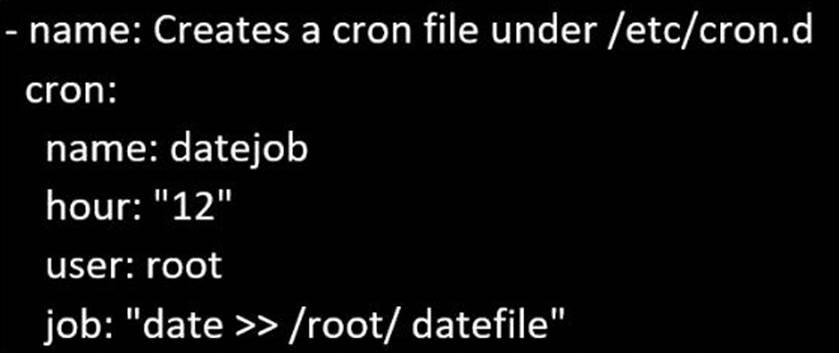
Create a playbook called regulartasks.yml which has the system that append the date to /root/datefile every day at noon. Name is job 'datejob'
정답: Solution as:
Question No : 13
CORRECT TEXT
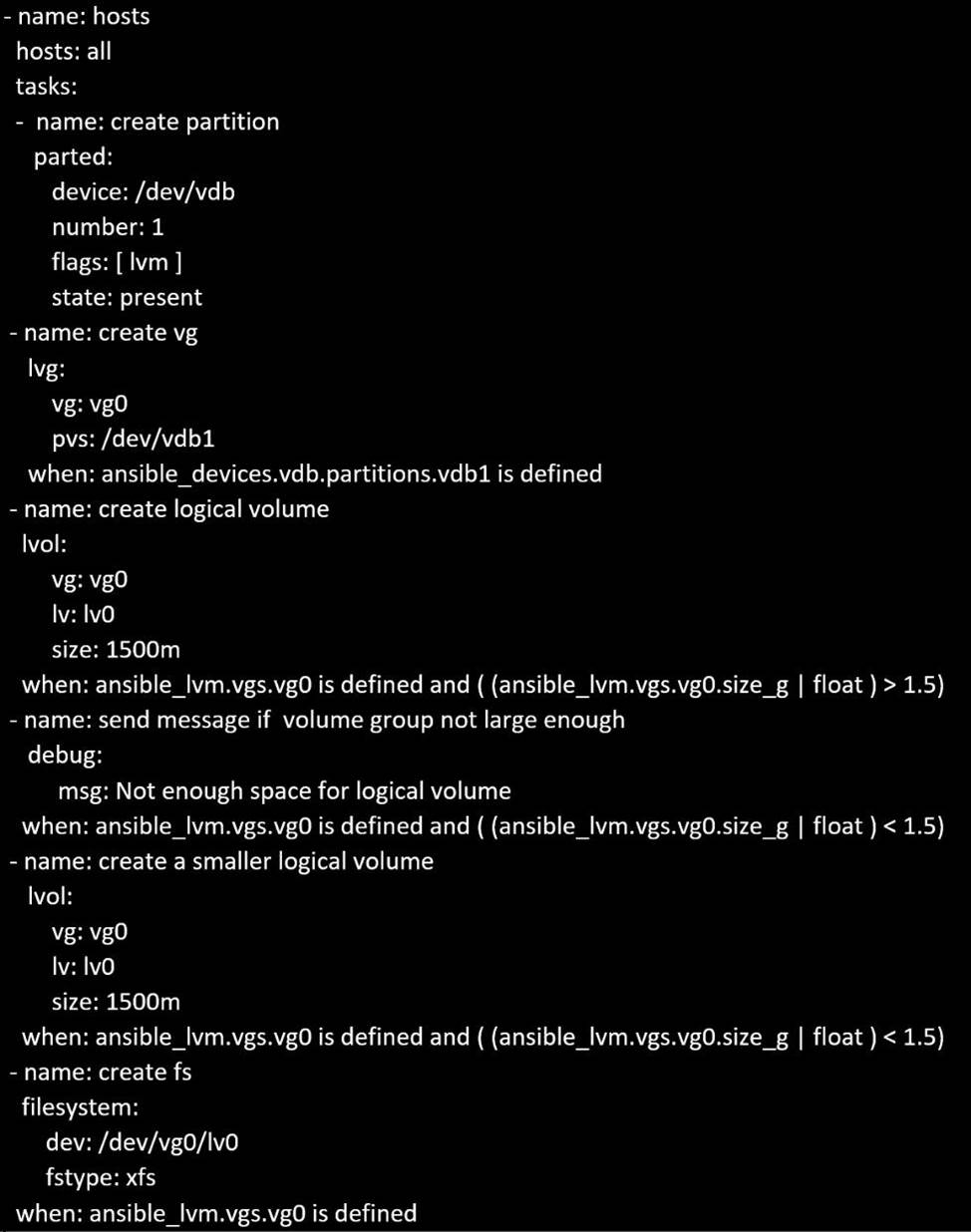
In /home/sandy/ansible/create a playbook calledlogvol.yml. Inthe play create a logical volume calledIv0and make it of size 1500MiB on volume groupvgOIf there is not enough space in the volume groupprinta message"Not enough space for logical volume"and then make a 800MiBIv0instead. If the volume group still doesn't exist, create a message "Volume group doesn't exist"Create anxfsfilesystem on allIv0logical volumes. Don't mount the logical volume.
정답: Solution as:
Question No : 14
CORRECT TEXT
Create an empty encrypted file calledmyvault.yml in /home/sandy/ansibleand set the passwordtonotsafepw. Rekey the passwordtoiwejfj2221.
정답: ansible-vault create myvault.yml Create new password: notsafepw Confirm password: notsafepwansible-vault rekeymyvault.yml
Current password: notsafepw New password: iwejfj2221 Confirm password: iwejfj2221
Question No : 15
CORRECT TEXT
Create a file called packages.yml in/home/sandy/ansibleto install some packages for the following hosts. On dev, prod and webservers install packages httpd, mod_ssl, and mariadb. On dev only install the development tools package. Also, on dev host update all the packages to the latest.
정답: Solution as:
** NOTE 1 a more acceptable answer is likely 'present' since it's not asking to install the latest
state: present
** NOTE 2 need to update the development node
-name: update all packages on development node
yum: name: '*' state: latest